


Peacock TV: Stream TV & Movies
4.581.44K Reviews
App Specs
- Version
- Varies with Device
- Updated On
- License
- Free
- Downloads
- 50,000,000+
- Developer
- Peacock TV LLC
- Categories
- Entertainment
- Platform
- Android, iOS
Screenshots







 Analysis by AppCompare
I’ve found Peacock TV: Stream TV & Movies most useful when a household wants one place to browse familiar shows, films, live sports, and newer entertainment without deciding in advance what to put on. It is an entertainment app from Peacock TV LLC, and its mix of on-demand viewing and live programming gives it a different feel from services built mainly around a single kind of content. I’d treat it as a flexible option for shared evenings, not as a guarantee that every person in the home will find every title they want.
Discovering the Features
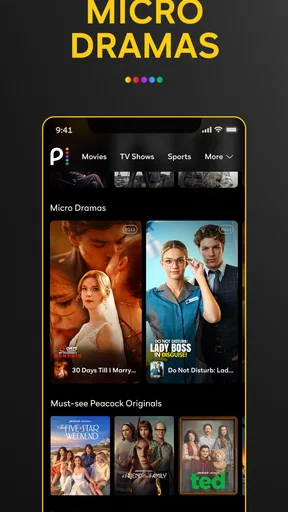
First off, let's talk about the user interface. Navigating through the app is a breeze. The home screen is neatly organized, showcasing trending shows, must-watch movies, and a variety of genres. One thing I appreciated was the "Channels" section, which feels like flipping through traditional TV channels but with a modern twist. It's perfect for those moments when you can't decide what to watch.
That channel-style browsing can work particularly well in a shared room: one person can put something on while everyone settles in, rather than turning the first few minutes into a long search. It is also a useful fallback when a group cannot agree on a specific film. The trade-off is that browsing a stream of programming is less deliberate than choosing a particular episode, so I’d use it for casual background viewing rather than when I have a specific title in mind.
The app also offers a handy "Continue Watching" feature, so you can pick up right where you left off. No more losing track of episodes or movies! Plus, the search function is pretty robust, making it easy to find specific titles or discover new ones based on your interests.
On a shared device, I’d make a small habit of checking what is already in Continue Watching before handing the screen to someone else. It can help the next viewer spot where they left off, but it can also make the row feel less personal if several people use the same viewing space. Search is the better route when somebody has a clear plan; browsing is better when the household is open to suggestions. That simple distinction saves time and avoids treating the home screen as a perfect record of everyone’s tastes.
Content Galore
Now, onto the most important part: the content. Peacock TV boasts a vast library of shows and movies. Whether you're into comedy, drama, or thrillers, there's something here for you. I was particularly impressed with the selection of classic TV shows and movies – it’s like a stroll down memory lane. And if you're a fan of original programming, Peacock doesn’t disappoint. Their exclusive shows and movies bring fresh stories and unique perspectives to the table.
This range is a strength when a household has different moods across the week: a familiar older show can suit a low-effort evening, while a film or original series gives the group something new to try. It also means Peacock can sit alongside a more specialized service rather than replace every subscription. If your main priority is a particular niche, or you only want one narrowly defined kind of catalogue, a service focused on that interest may be easier to browse. Peacock makes more sense when variety itself is valuable.
Worth Reading Before You Choose

Flipboard Shows What News Apps Must Do Beyond the Feed

Switching to Android Auto Means Rethinking Your Driving Routine

Google Calendar Makes a Crowded Week Easier to Manage

Ludo King Makes the Most of the Minutes Between Plans

Baby Panda World Brings Quick Play to Modern Phones, but Its Game Library Feels Busy

ESPN’s Live Game View Makes Following Close Games Easier
Sports fans, rejoice! Peacock TV also provides live sports streaming, which is a game-changer (pun intended) for catching live events on the go.
Live viewing changes the way I’d plan around the app. For an event, it helps to decide who is using the shared screen and when, instead of assuming that an on-demand episode can wait until later. If someone else wants a film at the same time, that is a household scheduling issue rather than a discovery problem. For viewers who mostly want to watch whenever they have a spare moment, the on-demand library may be the stronger reason to install it; for sports viewers, the live element adds a different kind of usefulness.
Setting Up a Shared Viewing Routine
Peacock is free to download, which makes it easy to try before deciding whether it belongs in a household’s regular rotation. The app has an average rating of 4.5 from around 572,000 ratings, and it has been installed over 50 million times. Those figures suggest broad interest, but I wouldn’t use popularity as a substitute for checking whether the shows, films, and live programming you actually want are available to you.
The practical question is often not how many people can watch, but how the household wants to use the same screen. Before starting a show together, I’d agree on whether the group is choosing one shared title or whether the app is simply there for whoever has the remote. That small conversation matters because Continue Watching can mix viewing activity, and the next person may encounter titles they did not choose. I would not assume that a shared device automatically creates separate viewing boundaries.
A realistic routine might be to use the app for a live event in the evening, then let one person resume an unfinished series later. If that is how your home works, leave a moment to check the viewing row and confirm the right episode before pressing play. It is a minor step, but it can prevent someone from accidentally skipping ahead or starting the wrong programme. For a household that strongly prefers separate, clearly divided viewing histories, a service with account or profile arrangements that better fit that need may be a more comfortable choice.
Age, Cost, and Viewing Expectations
The app is rated Teen, so I’d treat that as useful context rather than a substitute for a parent or caregiver checking individual programmes. A broad entertainment library can include different kinds of material, and a household’s standards may be stricter than a general age label. If younger viewers use the same device, I’d choose what they watch deliberately and avoid assuming that a shared home screen is automatically tailored to them. That is especially sensible when adults and teens take turns using the app.
The free option is a low-commitment way to explore, but it includes ads, and some newer content may require a paid subscription. In-app purchases are listed from $7.99 to $169.99 per item, so I’d check the specific offer and terms shown in the app before making a purchase. The key decision is whether the available free viewing already suits your routine or whether access to additional content is worth paying for. I would not subscribe just because a title catches my eye until I had checked what access it requires.
Compared with the usual on-demand streaming alternatives, Peacock’s combination of a broad entertainment catalogue and live sports is its clearest distinction. A service with a stronger focus on a particular collection may be a better fit if you already know exactly what you want to watch. A conventional live-TV option may suit someone who wants a more familiar channel lineup, while Peacock’s Channels section offers a more casual way to browse within the app. I see it as an extra viewing destination, especially for mixed households, rather than an automatic replacement for every other service.
A Few Quirks
While Peacock TV offers a free tier, it comes with ads, which might not be everyone's cup of tea. If you're not a fan of interruptions, you might consider subscribing to the premium tier for an ad-free experience. Another thing to note is that some newer content may require a subscription to access, which could be a bummer if you're not ready to commit.
That distinction is worth checking before settling in for a family movie night: search for the intended title first and make sure it is available under the access you have. It is more frustrating to discover a subscription requirement after everyone has agreed on a film than to find out while browsing alone. Ads also affect the rhythm of a viewing session, so viewers who want uninterrupted playback should weigh that annoyance against how often they expect to use the app.
On the technical side, I noticed that the streaming quality is generally good, but it can vary depending on your internet connection. It's always a good idea to have a stable Wi-Fi connection for the best experience.
For everyday use, I’d start playback before a live event or a planned group watch rather than waiting until the exact moment everyone is ready. That gives you a chance to notice whether the connection is behaving well and choose another option if it is not. It is a practical precaution, not a promise that every connection will deliver the same result. If dependable streaming is the priority and your Wi-Fi is inconsistent, improving the connection or choosing another way to watch may matter more than changing apps.
The Final Take
All in all, Peacock TV: Stream TV & Movies is a solid choice for streaming enthusiasts. It's user-friendly, offers a wide range of content, and has something for everyone. Whether you're in the mood for a nostalgic trip with classic shows or eager to explore new original series, Peacock TV serves up the entertainment platter you crave.
I’d recommend trying it if your household likes to alternate between familiar series, films, and live sports, and if ads or a little coordination over a shared screen are acceptable. I’d skip it as a main service if you need a highly separated shared-device experience, want a specific catalogue that Peacock does not satisfy, or strongly dislike ad breaks. Its Teen rating is a helpful starting point for age decisions, but it does not remove the need to choose suitable programmes together.
So, if you're ready to explore a new world of streaming, download the app and start watching! Who knows, you might just find your next favorite show or movie right here.
Pros
- Wide variety of content available.
- User-friendly interface design.
- Free tier with limited ads.
- Exclusive shows and movies.
- Live sports streaming options.
Cons
- Limited offline viewing options.
- Ads can be intrusive in free version.
- Content library varies by region.
- No personalized recommendations.
- Requires stable internet connection.
FAQs for Peacock TV: Stream TV & Movies
What content is available on Peacock TV?
Peacock TV offers a wide variety of content, including popular TV shows, movies, live sports, news, and exclusive originals. Subscribers can enjoy classics from NBCUniversal’s vast library, as well as new and trending titles. The service also features live sports events and news channels, appealing to diverse viewing preferences.
Is Peacock TV free to use?
Peacock TV offers a free tier with limited access to its content library. Users can watch select movies, shows, and episodes without a subscription. However, for full access to all content, including premium movies and exclusive originals, users need to subscribe to either the Peacock Premium or Peacock Premium Plus plans.
Can I download content for offline viewing on Peacock TV?
Yes, Peacock TV allows users to download certain titles for offline viewing. This feature is available for subscribers of the Peacock Premium Plus plan. Offline downloads are convenient for watching content without an internet connection, making it ideal for travel or areas with limited connectivity.
On which devices can I watch Peacock TV?
Peacock TV is compatible with a wide range of devices. Users can stream on smartphones and tablets (iOS and Android), smart TVs, game consoles, and streaming media players. Additionally, it supports web browsers, allowing for flexible viewing on various platforms to suit individual preferences.
Does Peacock TV offer parental controls?
Yes, Peacock TV provides parental controls to help manage what children can watch. Parents can set up Kids Profiles, which limit content to age-appropriate shows and movies. This feature ensures a safer viewing environment, giving parents peace of mind when their children are accessing the platform.


